Documentation Portal
Soledad Documentation
Create Contact Form 7 forms, use form markup, and add the shortcode to posts or pages.
36 articles across 15 sections.
Integrations
How to Set Up Contact Form
Soledad uses plugin Contact Form 7 to help you create a contact form - It's free.
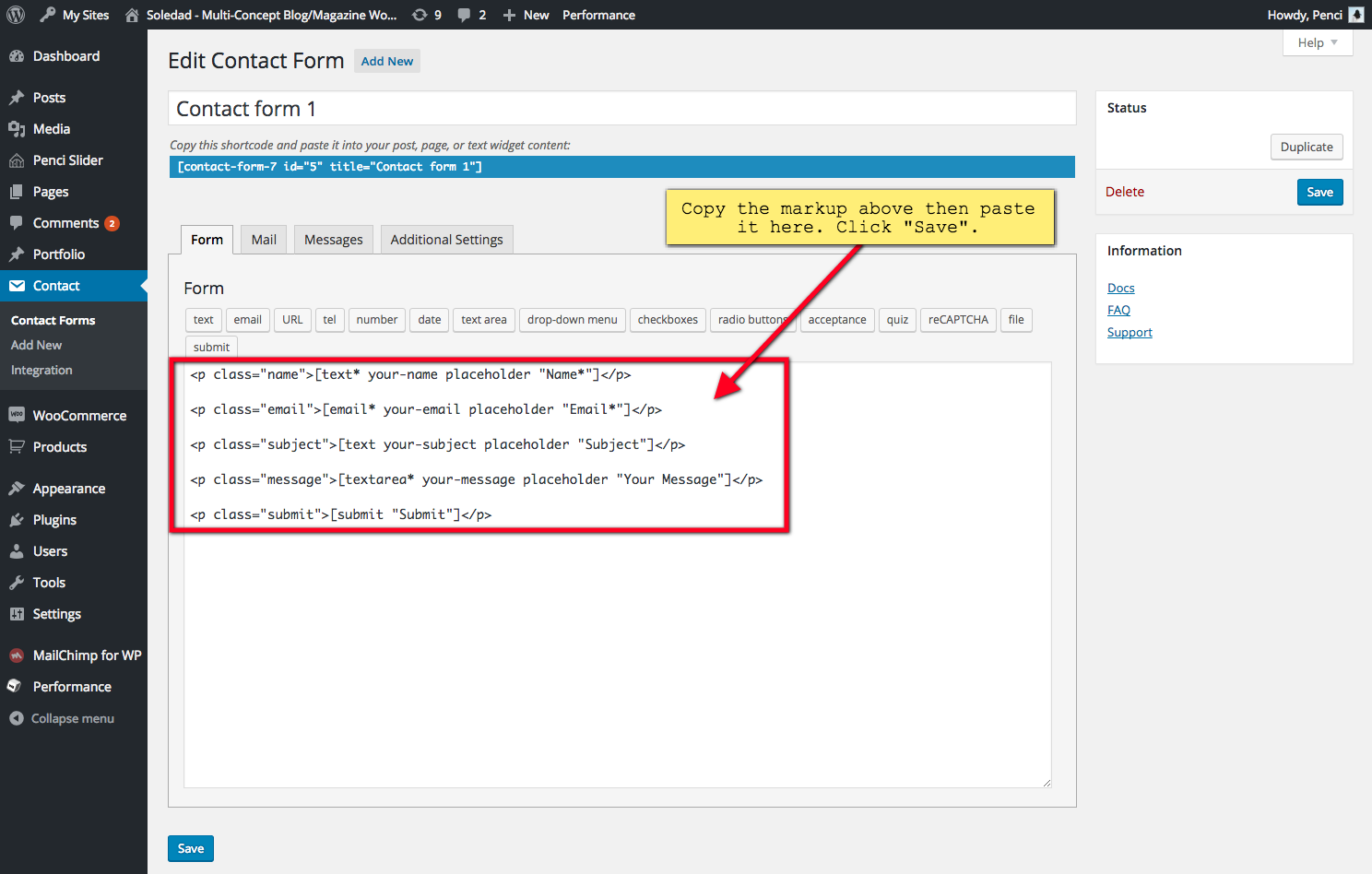
After installing this plugin, go to Contact > Contact Forms > Add New/ Edit a Contact Form and use the following this mark-up and paste it to your form( Of course, you can edit the text "Name", "Email", "Subject", "Your Message", "Submit" to the text as you want ):
<p class="name">[text* your-name placeholder "Name*"]</p>
<p class="email">[email* your-email placeholder "Email*"]</p>
<p class="subject">[text your-subject placeholder "Subject"]</p>
<p class="message">[textarea* your-message placeholder "Your Message"]</p>
<p class="submit">[submit "Submit"]</p>
When it is done, use Contact Form 7 shortcode and paste to your posts/pages - where you want to display contact form. In the image below, the shortcode showing in the blue line.
Click the image to view a larger version.